HIPAA IT Compliance Checklist: Security Rule & Audit Essentials
August 12, 2026
A pattern we notice again and again is that many medical practices only think about HIPAA IT compliance when an audit or breach is looming. Teams often assume their systems are secure, but small gaps—like missing encryption or outdated access controls—can put patient data at risk.
"A HIPAA IT compliance checklist helps you spot and fix gaps before they become costly problems."
Industry research shows that most HIPAA violations stem from overlooked technical safeguards rather than intentional misuse. That’s why using a checklist is so important: it gives you a clear, step-by-step way to comply with HIPAA requirements, protect patient information, and avoid penalties. Whether you’re a covered entity or business associate, a strong compliance program is essential for building trust and meeting legal obligations. The checklist helps you organize your compliance efforts, stay up to date with the HIPAA Privacy Rule, address overlooked technical safeguards, and prepare for audits or breach-notification scenarios.
Understanding the HIPAA IT compliance checklist
A HIPAA IT compliance checklist is more than just a to-do list—it's a practical guide for protecting sensitive health data. It covers the technical, administrative, and physical safeguards you need to keep electronic protected health information (ePHI) safe. By following the checklist, you can make sure your systems meet all HIPAA technical safeguards and medical practice IT requirements.
The checklist is especially useful for small and mid-sized healthcare organizations. It helps you break down complex rules into manageable steps, so you don’t miss anything important. Using a checklist also makes it easier to train staff, update policies, and show compliance during a HIPAA audit. With the right approach, you can achieve HIPAA compliance and reduce the risk of costly breaches.

Top steps for using a HIPAA IT compliance checklist
Getting started with a HIPAA IT compliance checklist can feel overwhelming. Here are the most important steps to help you stay on track and avoid common mistakes.
Step 1: Identify all ePHI systems
Start by listing every system, device, or application that stores or transmits electronic protected health information. This includes servers, laptops, cloud storage, and even mobile devices. Knowing where your data lives is the first step toward strong HIPAA security.
Step 2: Assess current security controls
Review your existing security measures, like firewalls, encryption, and access controls. Make sure they meet the HIPAA Security Rule requirements. If you find any gaps, document them and plan for improvements.
Step 3: Update policies and procedures
Your written policies should match your actual IT practices. Update them regularly to reflect changes in technology or regulations. This helps your team stay on the same page and supports compliance efforts.
Step 4: Train your staff
Regular HIPAA training is essential. Make sure everyone understands their role in protecting patient data, from front desk staff to IT administrators. Well-trained teams are less likely to make costly mistakes.
Step 5: Monitor and audit regularly
Set up regular audits to check for compliance. Use automated tools or manual reviews to spot issues early. This proactive approach helps you avoid surprises during official HIPAA audits.
Step 6: Prepare for breach notification
Have a clear plan for responding to data breaches. Make sure you understand the breach notification rule and know how to notify affected patients and authorities if needed.
Step 7: Review business associate agreements
Check that all your business associates have signed agreements that require them to comply with HIPAA. This protects your organization if a partner causes a data breach.
Essential features of a HIPAA IT compliance checklist
A good HIPAA IT compliance checklist should include these key features:
- Covers all HIPAA technical safeguards, including encryption and access controls.
- Breaks down medical practice IT requirements into clear, actionable steps.
- Includes regular review and update schedules for policies and systems.
- Guides staff training and awareness.
- Addresses breach notification rule requirements and response plans.
- Offers templates or examples for business associate agreements.

Why technical safeguards matter in HIPAA compliance
Technical safeguards are a core part of the HIPAA security rule. They focus on the technology and processes that protect ePHI from unauthorized access or disclosure. Without strong technical safeguards, even the best policies can fall short.
For example, encryption ensures that data is unreadable if stolen, while access controls limit who can view or change sensitive information. Regular risk assessments help you find weak spots in your systems. By following the HIPAA IT compliance checklist, you make sure these safeguards are in place and working as intended. This not only helps you comply with HIPAA but also builds trust with patients and partners.
Common mistakes to avoid with HIPAA security and breach notification rule
Even well-meaning teams can overlook important details. Here are some common mistakes to watch out for when using a HIPAA IT compliance checklist.
Mistake 1: Skipping regular risk assessments
Many organizations do an initial risk assessment but forget to repeat it. HIPAA requires ongoing assessments to catch new threats as technology and workflows change. Make risk assessments a regular part of your compliance program.
Mistake 2: Incomplete documentation
Failing to document your security measures and policies can hurt you during a HIPAA audit. Keep detailed records of your compliance efforts, updates, and staff training sessions.
Mistake 3: Ignoring business associate risks
Not all business associates take HIPAA seriously. Review your business associate agreements and make sure partners understand their responsibilities. This step helps protect your organization from third-party breaches.
Mistake 4: Delayed breach notifications
If a breach occurs, the breach notification rule requires you to act quickly. Delays can lead to bigger fines and loss of trust. Have a clear plan and practice it regularly.
Mistake 5: Outdated technical safeguards
Technology changes fast. Make sure your encryption, firewalls, and other safeguards are current. Regularly update your systems to stay compliant and secure.
Mistake 6: Overlooking physical security
HIPAA compliance isn’t just about IT. Physical safeguards, like locked server rooms and secure disposal of old devices, are also required. Don’t let physical risks undermine your efforts.
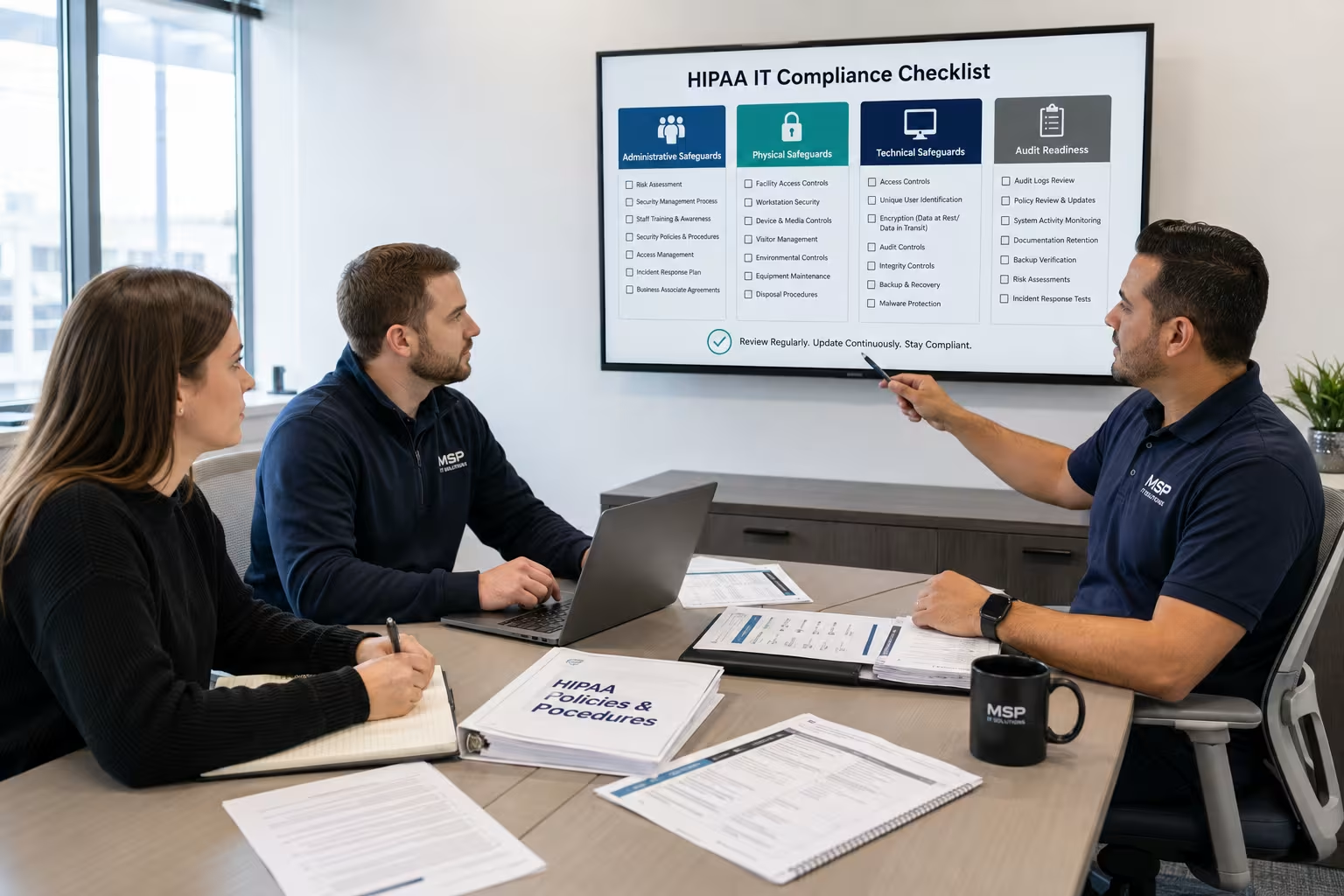
Key benefits of following a HIPAA IT compliance checklist
Using a HIPAA IT compliance checklist offers several important advantages:
- Reduces the risk of costly data breaches and penalties.
- Makes it easier to comply with HIPAA technical safeguards and medical practice IT requirements.
- Helps organize compliance efforts and track progress over time.
- Improves staff awareness and accountability.
- Supports a culture of security and trust within your organization.
- Simplifies preparation for audits and inspections.
Practical steps for implementing a HIPAA IT compliance checklist
Putting your HIPAA IT compliance checklist into action takes planning and teamwork. Start by assigning a HIPAA compliance officer or team to oversee the process. This person should coordinate efforts, track progress, and serve as the main contact for compliance questions.
Next, review your current systems and policies against the checklist. Involve IT staff, managers, and anyone who handles patient data. Use the checklist to identify gaps and set priorities for improvement. Regularly update your checklist as regulations or technology change, and keep everyone informed through ongoing HIPAA training.
Best practices for HIPAA privacy rule and audit readiness
Following best practices can help you stay compliant and ready for any audit. Here are some tips to keep in mind:
- Schedule regular HIPAA risk assessments and document the results.
- Update your HIPAA compliance program as new threats or regulations emerge.
- Store all compliance records in a secure, easy-to-access location.
- Test your breach notification procedures at least once a year.
- Review and renew business associate agreements regularly.
- Encourage open communication about compliance concerns.
Taking these steps can make compliance less stressful and more effective.

How Sterling can help with HIPAA IT Compliance
Are you a business with 20 to 80 employees looking to simplify HIPAA compliance? Growing organizations often face unique challenges as they expand, especially when it comes to keeping up with HIPAA technical safeguards and medical practice IT requirements. Our team understands the pressures of scaling while staying compliant.
We help you navigate every step of the HIPAA IT compliance checklist, from risk assessments to staff training and breach notification planning. If you want to achieve HIPAA compliance without the guesswork, contact us today. Let Sterling be your compliance experts.
Frequently asked questions
What is included in a HIPAA compliance checklist for small practices?
A HIPAA compliance checklist for small practices covers everything from technical safeguards to staff training and breach notification rule requirements. It helps you organize your compliance program and ensures you don’t miss key steps, like updating policies or reviewing business associate agreements.
By following the checklist, you can show that your compliance efforts meet HIPAA requirements and prepare for any audit. This approach also makes it easier to train new staff and keep up with changing regulations.
How does HIPAA security affect medical practice IT requirements?
HIPAA security directly impacts your medical practice IT requirements by setting standards for how you protect patient data. Covered entities and business associates must use reliable systems, strong passwords, and encryption to comply with HIPAA security rule standards.
Meeting these requirements helps you avoid data breaches and penalties. It also builds trust with patients and partners who expect their information to be safe.
What is the breach notification rule, and how does it work?
The breach notification rule requires covered entities and business associates to notify affected individuals and authorities if there is a data breach involving protected health information. This rule is a key part of the HIPAA Privacy Rule and helps ensure transparency.
Having a clear plan for breach notification is essential for compliance. It also protects your reputation by showing you take patient privacy seriously and respond quickly to incidents.
How often should we review our HIPAA security rule policies?
You should review your HIPAA Security Rule policies at least once a year, or whenever there are major changes to your systems or regulations. Regular reviews help you stay compliant and catch any gaps early.
Assigning a HIPAA compliance officer to oversee these reviews can make the process smoother. Keeping policies up to date also supports your compliance program and audit readiness.
Why is a HIPAA audit important for compliance?
A HIPAA audit checks whether your organization is following all required safeguards and policies. It helps you find weaknesses and improve your compliance efforts before regulators step in.
Preparing for an audit with a HIPAA checklist can reduce stress and show that you take compliance seriously. Regular audits also help you keep up with HIPAA requirements as your business grows.
How can we use a free HIPAA checklist to achieve compliance?
A free HIPAA checklist is a great starting point for understanding what steps you need to take. It breaks down complex rules into simple tasks, making it easier to comply with HIPAA requirements.
Using the checklist helps you track progress, identify gaps, and organize your compliance program. For best results, work with compliance experts who can tailor the checklist to your specific needs.

Landon Carter
Outside of work I enjoy traveling with my wife and son, helping coach little league baseball teams, and cheering on the Carolina Panthers.


